Advertisements

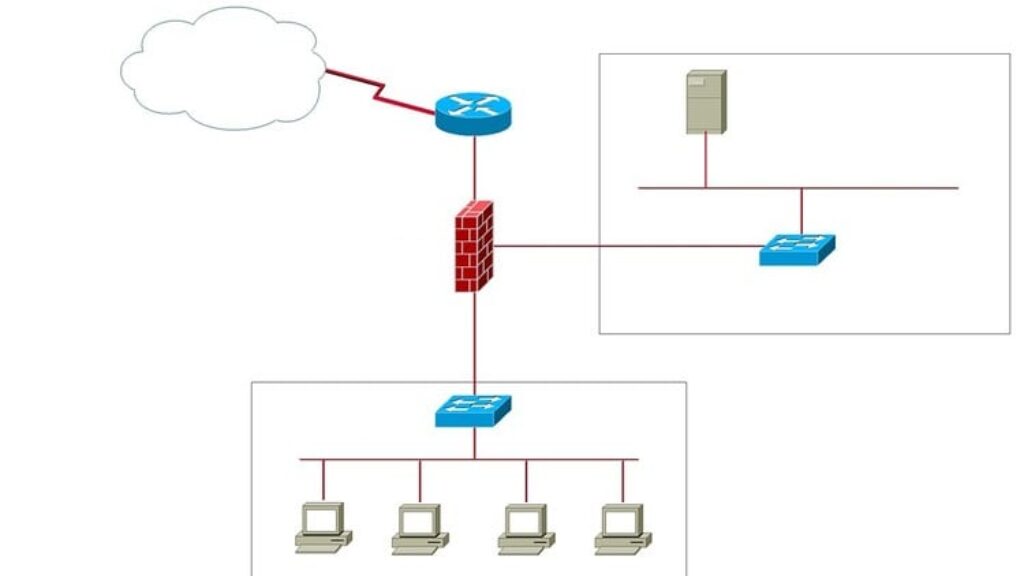
Hands on Cisco Packet Tracer: How to Create a DMZ Network

Advertisements
Design and Configure DMZ Networks Using Cisco Routers in Packet Tracer – A Practical Security Lab Course
5
5/5
(1) Ratings
200 students
Created by Dan Mill
Advertisements

What you'll learn

  • Understand what a DMZ (Demilitarized Zone) is and why it’s critical in network security design.
  • Design and build a functional DMZ network in Cisco Packet Tracer.
  • Implement NAT and Port Forwarding to expose public services safely from the DMZ.
  • Use OSPF and static routing to connect internal, DMZ, and external networks logically and securely.
  • Apply Access Control Lists (ACLs) to tightly control traffic between internal, DMZ, and external networks.
  • Understand the role of edge routers, DMZ routers/firewalls, and internal LAN segmentation.
  • Control outbound and inbound traffic to protect internal resources and prevent unauthorized access.
  • Use real-world best practices to simulate enterprise-grade security setups—even in Packet Tracer!
This course includes:
2.5 total hours on-demand video
1 articles
3 downloadable resources
36 lessons
Full lifetime access
Access on mobile and TV
Certificate of completion
Advertisements

Course content

Requirements

  • Basic knowledge of networking concepts such as IP addressing, subnets, and routing.
  • Familiarity with Cisco IOS commands (e.g., configuring interfaces, static routes, and basic ACLs).
  • Cisco Packet Tracer installed—this free tool will be used throughout the course.
  • A willingness to learn hands-on through practical, real-world network design scenarios.

Description

Are you ready to take your networking skills to the next level? Want to build secure network architectures just like the pros—without being held back by outdated tools? Then this course is for you.

In this hands-on course, you’ll learn how to design and configure a fully functional DMZ (Demilitarized Zone) Network using Cisco routers in Packet Tracer.

You’ll start with the basics—what a DMZ is, why it’s important, and where it’s used. Then, you’ll dive into the practical skills: configuring an Edge Router, setting up the DMZ Firewall Router, connecting your internal LAN, and adding public-facing servers like web and mail servers. You’ll also configure NAT, port forwarding, OSPF routing, and powerful ACLs to manage and secure traffic between each zone.

What makes this course different? It’s designed to be 100% hands-on, realistic, and engaging. You’re not just watching commands—you’re building, configuring, and troubleshooting like a true network engineer.

By the end of this course, you’ll have:

  • A fully working DMZ topology in Packet Tracer

  • A deep understanding of how to control traffic between internal, DMZ, and external networks

  • Practical experience with NAT, ACLs, and routing protocols in a secure design

  • The confidence to design and explain DMZ networks in interviews or the workplace

Whether you’re studying for certifications, building a lab, or just passionate about network security, this course gives you the skills to level up your networking career.

Let’s build something powerful. Enroll now!

Who this course is for:

  • Aspiring Network Engineers who want to build real-world lab setups and understand DMZ architecture.
  • IT Students and Beginners looking to strengthen their understanding of network security concepts.
  • Sysadmins and Helpdesk Technicians ready to move into infrastructure and firewall roles.
  • Cybersecurity Enthusiasts wanting to learn how DMZs work and how to secure edge services.
Advertisements
9A848A11ACC05F455A18
Advertisements
Advertisements
Free Online Courses with Certificates
Logo
Register New Account