Learn Fusion 360 by Designing Real Products — From Day One
Most Fusion 360 courses teach you tools. Extrude. Revolve. Fillet. Loft. You learn what every button does — and then you sit in front of a blank canvas, completely stuck, with no idea how to design anything real.
This course is different.
From the very first project, you’ll be designing functional, real-world products in Fusion 360 — even if you’ve never opened a CAD program in your life. You’ll learn the tools as you need them, in the context of actually building something. By the end, you won’t just know Fusion 360 — you’ll know how to think like a product designer.
What You’ll Build
This course is built around hands-on projects you’ll design from scratch:
-
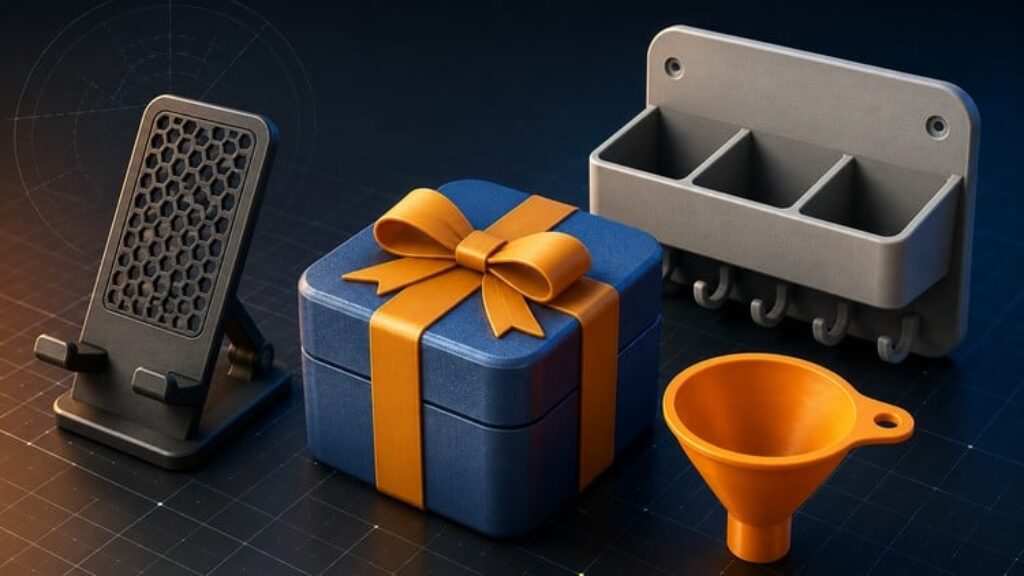
A phone stand that holds your phone at the perfect angle
-
A wall-mounted rack with clean, manufacturable geometry
-
A funnel designed with revolves and section analysis
-
An Allen key model for precision practice
-
Snap-fit storage boxes with working clearances and tolerances
-
A hinged assembly with real motion
-
A complete gift box project as your final build — refined, decorated, and entirely yours
Every project is designed to be 3D-printable, so you can take what you design in Fusion 360 and turn it into something you can hold in your hand.
What You’ll Actually Learn
Beyond the projects, you’ll walk away with skills that apply to anything you design in the future:
-
The core Fusion 360 toolset — sketching, extrude, revolve, shell, fillet, chamfer, and more
-
Parametric modeling and timeline editing so you can change designs without starting over
-
Design intent — why parts are built the way they are, not just how
-
Tolerances, clearances, and snap-fit techniques that make parts actually fit together
-
How to prepare designs for 3D printing — wall thickness, orientation, manufacturability
-
Multi-part assemblies with joints, components, and working motion
-
The mindset of a product designer — how to look at a problem and design your way to a solution
Who This Course Is For
This course is for complete beginners. If you’ve never used CAD before, you’re in the right place. If you’ve tried Fusion 360 tutorials before and felt lost or bored, you’re especially in the right place.
It’s also for makers, hobbyists, students, and 3D printing enthusiasts who are tired of downloading other people’s models and want to design their own.
You don’t need any prior experience. You don’t need a 3D printer (though you can print everything you make). You just need a computer that can run Fusion 360 — and a willingness to build.
Why Learn From Me
I’m a software engineer who fell in love with product design and 3D printing. My background gives me a slightly different lens — I think about systems, edge cases, and what happens when things don’t go as planned. Which, it turns out, is half of what good design is about.
I teach the way I wish I’d been taught: by building real things, in context, with every decision explained. No filler. No watching me click through menus. Just practical, focused projects that move you forward every lesson.
By the End of This Course
You’ll have a portfolio of real projects you designed yourself. You’ll understand Fusion 360 deeply enough to design your own products from scratch. And you’ll have the confidence to take any idea in your head and turn it into something real.
That’s what this course is about.
Enroll now, and let’s design something real together.