Advertisements

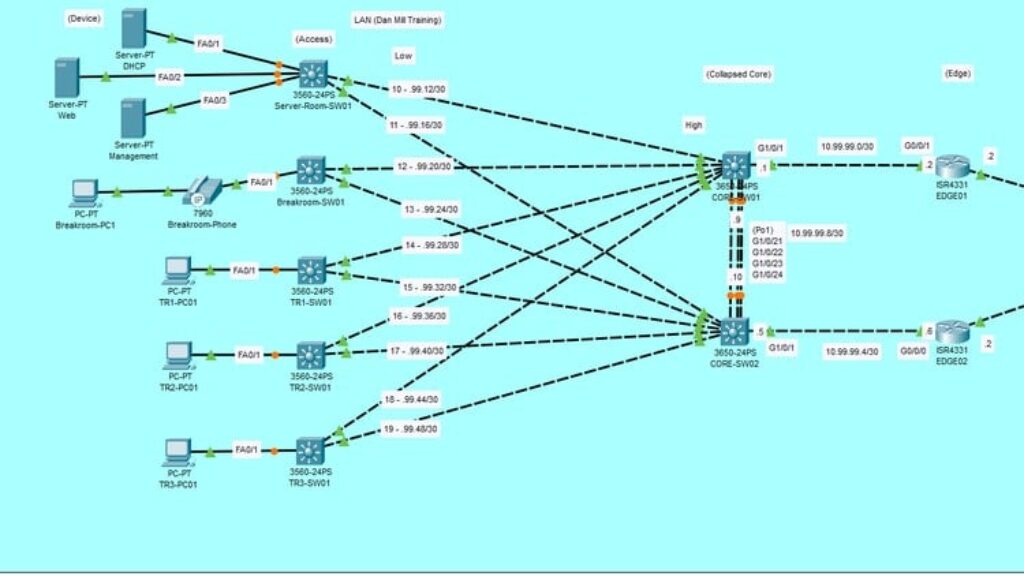
Hands on Cisco Packet Tracer: How to Build a Company Network

Advertisements
Hands-On Cisco Packet Tracer: Build & Configure a Real-World Business Network from Scratch!
4.9
4.9/5
(10) Ratings
321 students
Created by Dan Mill
Advertisements

What you'll learn

  • How to design and build a complete company network using Cisco Packet Tracer from scratch.
  • Configuring switches and routers for proper connectivity, including VLANs, trunking, and inter-VLAN routing.
  • IP Addressing and Subnetting to efficiently allocate IPs and avoid conflicts.
  • Implementing essential network services like DHCP, NAT, and DNS to support business operations.
  • Setting up security features such as Access Control Lists (ACLs) and basic firewall rules to protect the network.
  • Connecting offices using static and dynamic routing protocols OSPF.
  • Troubleshooting and optimizing network performance using real-world troubleshooting techniques.
  • Simulating real-life business scenarios to gain hands-on experience in managing a professional network.
This course includes:
3 total hours on-demand video
3 articles
39 downloadable resources
37 lessons
Full lifetime access
Access on mobile and TV
Certificate of completion
Advertisements

Course content

Requirements

  • Basic understanding of networking concepts (helpful but not required—everything will be explained step by step).
  • A computer with Cisco Packet Tracer installed (free software download link will be provided in the course).
  • Willingness to learn through hands-on practice—this is a practical, lab-based course.
  • No prior Cisco experience is required, but familiarity with networking fundamentals can be beneficial.

Description

Are you ready to build and configure a real-world business network from scratch using Cisco Packet Tracer? This hands-on course will take you step by step through designing, implementing, and troubleshooting a fully functional company network—even if you are new to networking.

What You Will Learn

  • Network design principles for business environments

  • Configuring switches and routers for seamless connectivity

  • Implementing VLANs, trunking, and inter-VLAN routing

  • Mastering IP addressing and subnetting for efficient network management

  • Setting up DHCP, NAT, and DNS to support business operations

  • Configuring Access Control Lists (ACLs) and firewall rules for security

  • Connecting remote offices with static and dynamic routing protocols such as OSPF,

  • Troubleshooting real-world network issues with professional techniques

Who Is This Course For?

This course is designed for IT students, aspiring network engineers, and professionals preparing for Cisco certifications. Whether you are completely new to Cisco Packet Tracer or looking to sharpen your networking skills, this course will equip you with practical, job-ready knowledge.

Why Take This Course?

  • Hands-on learning with interactive labs and step-by-step guidance

  • No prior experience required – perfect for beginners

  • Real-world scenarios to simulate business network setups

  • Clear explanations and structured lessons to build confidence in networking

By the end of this course, you will have the skills and knowledge to design, configure, and troubleshoot a professional company network using Cisco Packet Tracer.


Who this course is for:

  • By the end of this course, students will be able to confidently design, configure, and troubleshoot business networks, preparing them for real-world IT roles or Cisco certification exams.
Advertisements
50EB291833AEC996B012
Advertisements
Advertisements
Free Online Courses with Certificates
Logo
Register New Account